Oracle® Insurance Policy Administration 9.6.0.0 E35883-01
Allocations are defined at the policy level initially. This is done through the Allocation link on the Left Navigation menu. They can also be set for a specific activity.
View plan level allocations from the Plan main menu by selecting the Plan Allocation option.
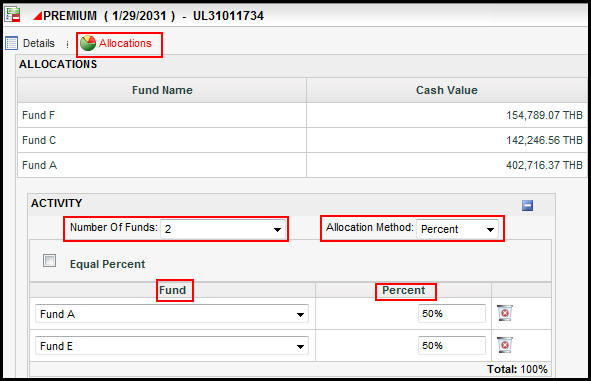
Activities that move money in or out of a policy have allocation options that can be set when adding the activity. The funds used for allocation can be selected, along with the number of funds used and the breakdown for each fund. The allocation method can also be selected.
If allocations are changed before the activity is added to the Activity screen, then the final allocation values that exist when the activity is added are the allocations that will be marked as "original." None of the previous allocation entries will be saved.
Add Activity Window Showing Activity with Allocations
Activity allocation information can be viewed after an activity processes. Click the activity detail icon to the left of the activity on the Activity screen. This opens the Activity Detail window. Click the Allocation link to display the allocation information. Both original and final activity allocations are displayed.
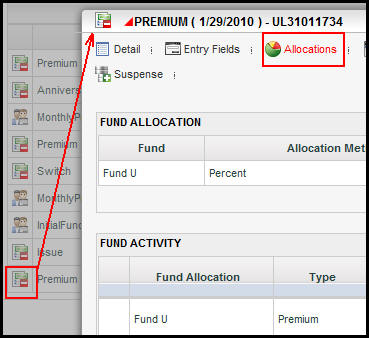
Activity Details Icon Highlighted with Open Activity Details Window
Copyright © 2009, 2013, Oracle and/or its affiliates. All rights reserved. Legal Notices